You signed up for VideoAsk because you wanted interactive video on your site. The interface was clean. Recording worked. You built a lead qualification flow, sent traffic to it, and 80 people replied in the first week.
Then you checked your dashboard. You’d burned through your processing minutes in six days. The tool locked your content behind an upgrade wall, not because the campaign failed, but because it worked. VideoAsk charged you by the minute, and engagement turned out to be expensive.
So you start searching for alternatives. You find Orwix Studio. It looks different. Not “better VideoAsk” different. A different category of tool entirely. One collects video replies. The other builds branching video funnels with conditional logic, 10 CTA types, and AI-generated content. And it charges a flat monthly rate regardless of how many people show up.
This comparison breaks down what each platform actually does, where each one fits, and why the answer to “which is better” starts with “better at what?”
Quick Verdict - A Video Form vs. a Video Funnel
VideoAsk is an asynchronous video form tool for collecting responses in HR, support, and lead qualification. Orwix Studio is an interactive video funnel builder with conditional branching, 10 CTA types, AI video generation, and flat-rate pricing. Same category label. Different tools entirely.
The distinction matters more than any feature comparison. VideoAsk asks a question on video and collects a reply. The viewer records a response, types an answer, or picks from multiple choice. The value flows inward, from the viewer to you.
Orwix Studio builds a path. The viewer enters a branching funnel, makes choices that shape what they see next, and encounters different CTAs at different nodes based on their behavior. The value flows outward, from you to the viewer, guiding them toward a conversion. Interactive video funnels command an average 18% conversion rate compared to 3% for passive video, a 500% improvement (ClickForest, 2026). That gap only exists when the viewer is doing something, not just watching.
A video form collects. A video funnel converts. Both are useful. They’re not interchangeable.
Pricing - Per-Minute Consumption vs. Flat Rate
VideoAsk charges $24-$40/mo based on processing minutes consumed, with unused minutes expiring every month. A successful campaign burns through credit faster than a failed one. Orwix Studio charges 399-950 SEK/mo (~$36-$86) flat with unlimited views and zero per-minute billing. Your best month never becomes your most expensive month.
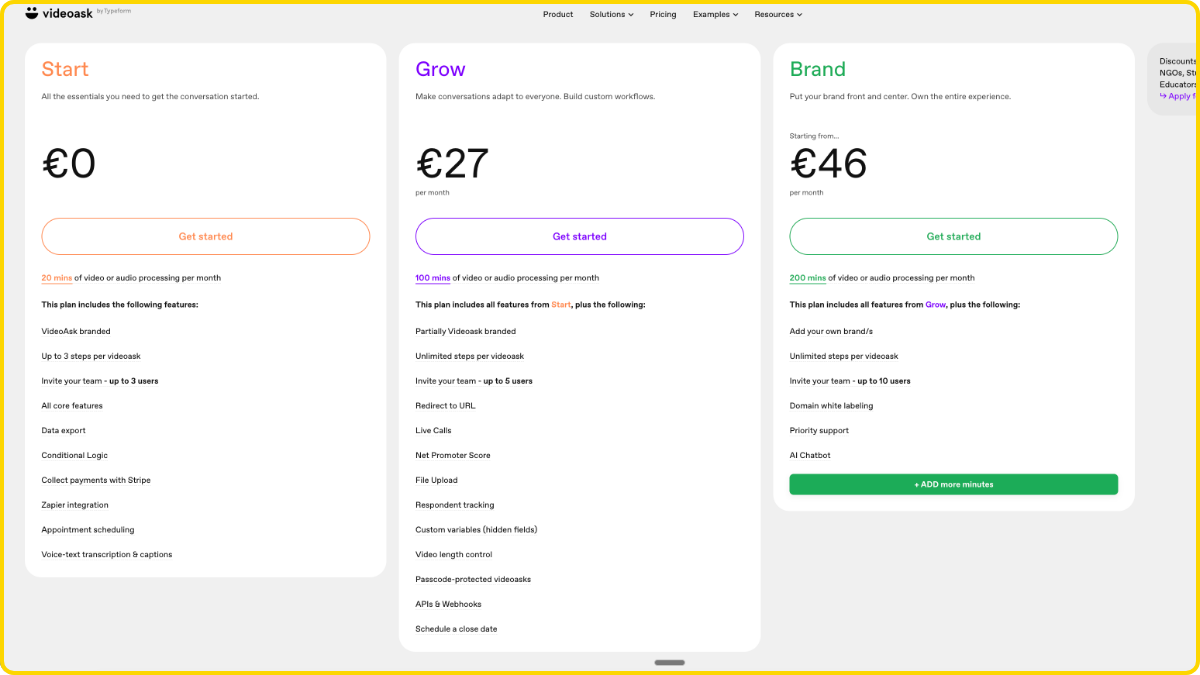
VideoAsk’s Per-Minute Consumption Model
VideoAsk bills on “processing minutes.” This doesn’t mean recording time. It means the aggregate minutes of video and audio processed across your account, including every respondent reply.
Three tiers:
- Start (Free): 20 minutes/month. Heavy VideoAsk branding. Maximum 3 users, maximum 3 steps per funnel.
- Grow ($24/mo): 100 minutes/month. Partial branding removal. 5 users. Unlimited steps.
- Brand ($40/mo): 200 minutes/month. Full white-label. AI Chatbot access. 10 users.
Minutes do not roll over. If you use 60 of your 100 minutes in March, the remaining 40 vanish on April 1st. If you exceed your limit, VideoAsk locks your content until you upgrade or wait for the next billing cycle.
The Engagement Trap - When Success Costs More
Here’s where the model breaks.
You create a 1-minute video prompt for lead qualification. You send traffic to it. Fifty prospects reply with 2-minute video responses. That’s your prompt (1 minute) plus fifty replies (100 minutes) = 101 minutes consumed. You just breached the Grow plan’s 100-minute ceiling in a single campaign.
Read that again. Fifty replies. That’s not a viral hit. That’s a Tuesday for a mid-funnel B2B campaign with decent targeting.
On the Grow plan, you now face a choice: upgrade to Brand ($40/mo for 200 minutes) or accept that your content is locked until next month. On Brand, the same math applies at 200 minutes. A second campaign, or the same campaign running for another two weeks, pushes you past the cap again.
A pricing model that punishes engagement is architecturally backwards for a marketing tool. The better your campaign performs, the more it costs. The more replies you get, the faster you hit the wall. This isn’t a complaint about VideoAsk being expensive. The billing structure creates a perverse incentive to not get responses.
For HR screening, where you might receive 15-20 candidate videos per job posting, the per-minute model is manageable. For marketing funnels running paid traffic, it’s a trap with a timer. And marketing is where the volume lives: 91% of businesses now use video as a primary marketing tool (Wyzowl, 2024), meaning most VideoAsk users aren’t HR teams with predictable low volumes.
Orwix Studio’s Flat-Rate Structure
Two tiers. No minute metering. No consumption tracking.
Start costs 399 SEK/mo ($36). You get 1 active flow with unlimited views. Pro costs 950 SEK/mo ($86). You get 5 active flows, white-label branding, and full branching logic. Still unlimited views.
The word “unlimited” gets overused in SaaS marketing. Here’s what it means specifically: Orwix does not meter video playback, viewer interactions, CTA clicks, or session counts. Your funnel can serve 100 viewers or 100,000 viewers in a month and your invoice reads the same number both times.
At scale, the gap is stark. A VideoAsk Brand plan gives you 200 processed minutes for $40/mo. An Orwix Studio Start plan gives you unlimited views for ~$36/mo. The VideoAsk plan runs dry mid-month if your campaign works. The Orwix plan doesn’t know or care how many people showed up.
| Pricing Factor | Orwix Studio | VideoAsk |
|---|---|---|
| Entry price | 399 SEK/mo (~$36) | $24/mo (Grow) |
| Top tier | 950 SEK/mo (~$86) | $40/mo (Brand) |
| Billing model | Flat rate, unlimited views | Per-minute consumption, minutes expire monthly |
| What happens at high engagement | Nothing. Same invoice. | Minutes burn faster. Content locks when limit is hit. |
| White-label branding | Pro tier (950 SEK/~$86) | Brand tier only ($40/mo) |
| Unused allocation | N/A, no metering | Minutes expire, do not roll over |
Flat-rate means your best month doesn’t become your most expensive month.
Pricing tells you what you’ll pay. The next question is what each platform actually lets your viewers do.
What Viewers Can Actually Do - Response Types vs. CTA Types
VideoAsk supports video replies, multiple choice, text input, NPS, and basic calendar scheduling, all designed to collect information from respondents. Orwix Studio ships 10 action-oriented CTA types including WhatsApp routing, SMS triggers, conditional promo reveals, and Shopify product cards, all configurable per node. One platform asks questions. The other triggers conversions.
VideoAsk’s Response Types
VideoAsk gives respondents several ways to reply to a video prompt. The full set: video response, audio response, multiple choice, open text input, NPS rating, basic calendar scheduling, and a single-item Stripe payment link.
These work exactly as you’d expect for a form tool. You record a question. The respondent picks a format and answers. The data flows back to you. For HR teams collecting candidate video intros, or support teams gathering async feedback, this covers the basics.
The constraint is directionality. Every interaction type is a response mechanism. The viewer reacts to your prompt. They don’t get guided down a path that changes based on their behavior. The calendar books a meeting. The NPS captures a score. The Stripe link processes a single payment. Each action is self-contained and terminal. Nothing branches. Nothing triggers a conditional follow-up.
The gaps matter for marketers. No WhatsApp routing. No SMS triggers. No promotional code reveals. No product cards. No conditional logic governing which CTA appears at which node. If you need a viewer who selected “enterprise” in node 3 to see a different booking CTA than one who selected “startup,” VideoAsk can’t do that.
Orwix Studio’s 10 Action Types
Orwix Studio treats CTAs as conversion mechanisms, not reply formats. Ten action types, each built for a specific moment in a funnel:
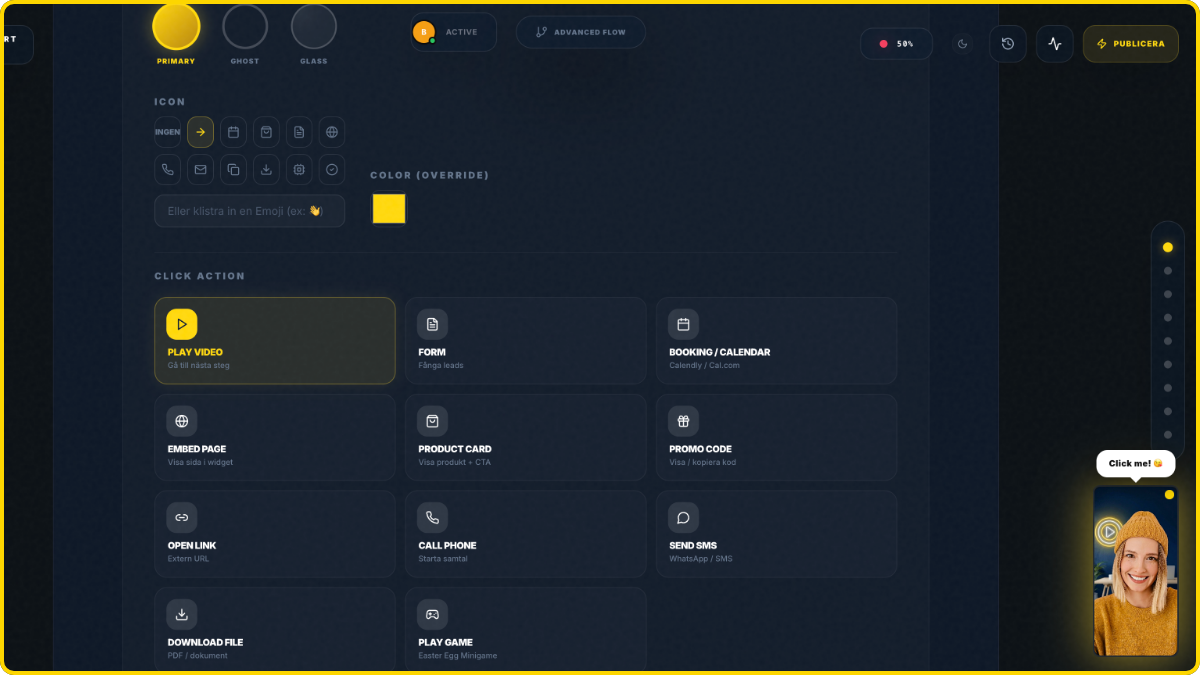
- Shopify product cards with Add to Cart
- Lead capture forms with custom fields
- Calendar booking integration
- Promo code reveals, conditional on prior viewer behavior
- WhatsApp chat routing, directed to specific agents based on branch selection
- SMS triggers fired on specific node exits
- URL redirects per branch
- Video responses from viewers
- Conditional buttons that change based on earlier choices
- Booking CTAs for service-based businesses
The difference isn’t the number. It’s the conditionality. A promo code doesn’t reveal itself to everyone who shows up. It reveals itself to the viewer who navigated past the objection-handling node and selected “yes, I’m ready.” An SMS trigger doesn’t fire for all viewers. It fires when a specific viewer exits at a specific drop-off point, giving you a follow-up channel for the almost-converted.
Responses vs. Actions - Why the Distinction Matters
A response collects data. An action drives behavior. Both have value. They serve different workflows.
HubSpot’s 2024 State of Marketing Report found that personalized CTAs convert 202% better than default versions. That finding applies to CTA format, not just copy. A WhatsApp button after a product demo node converts differently than a calendar link after the same node. The mechanism shapes the outcome.
VideoAsk gives your viewer one thing to do: reply. Orwix gives your viewer a menu of actions that changes based on where they are in the funnel and what they’ve already done. If you’re collecting feedback, replies are the point. If you’re driving conversions, actions are the point.
| Interaction Capability | Orwix Studio | VideoAsk |
|---|---|---|
| Video/audio response | Yes | Yes |
| Multiple choice | Yes (conditional per node) | Yes |
| Lead capture form | Yes (custom fields) | Yes (basic contact form) |
| Calendar booking | Yes | Yes (basic) |
| Shopify product cards | Yes | No |
| WhatsApp chat routing | Yes | No |
| SMS triggers | Yes | No |
| Conditional promo code reveal | Yes | No |
| NPS rating | No | Yes |
| Single-item Stripe payment | No | Yes |
Collecting replies and guiding decisions are two different products.
The CTA types define what happens when a viewer acts. The branching logic defines which CTA they see and when.
Branching Logic and the Builder Experience
VideoAsk supports basic branching through a linear dashboard, with the free tier capped at 3 steps per funnel. Power users note the builder requires “a fair amount of planning” due to its non-visual layout. Orwix Studio provides full conditional if/then branching in a visual The Studio builder, identical on mobile and desktop, with no step limits.
VideoAsk’s Linear Dashboard
VideoAsk lets you branch. You record a video, add response options, and route viewers to different follow-up videos based on their choice. The “choose your own adventure” structure works.
The builder, however, is where friction lives. VideoAsk maps branching through a linear dashboard, not a visual canvas. You create steps in sequence and connect them through dropdown menus. For a 3-step FAQ, this is fine. You can hold the logic in your head.
For a 10-node qualification funnel with conditional paths, it gets difficult to track. Power users have noted that building complex flows requires “a fair amount of planning” because the interface doesn’t show you the full decision tree at once. You edit one node at a time, mentally modeling how the paths connect.
The free tier adds another constraint: a maximum of 3 steps per funnel. If your logic needs a fourth node, you upgrade. The Grow ($24/mo) and Brand ($40/mo) tiers remove the cap, but the builder interface stays the same. More steps don’t change how you build them.
Orwix Studio’s Builder
Orwix Studio uses a visual, node-based Studio. You see the entire decision tree on one screen. Drag connections between nodes. Set if/then conditions visually. Add, remove, or reroute paths without losing sight of the overall flow.
The difference is spatial. A linear dashboard forces you to hold the logic in your head. A canvas puts the logic on screen. You see which node leads where, which CTA fires when, and where your drop-off points cluster. For a 3-step flow, both approaches work. For anything with real conditional depth, the visual map wins.
No step limits exist on any Orwix tier. Start gives you 1 active flow with unlimited nodes. Pro gives you 5 active flows with unlimited nodes. The builder doesn’t constrain complexity, it surfaces it.
Building Funnels on Mobile - Who Actually Supports It
Orwix’s Studio works identically on mobile and desktop. This isn’t a responsive fallback or a read-only mobile preview. You can build, edit, and reconfigure branching funnels from your phone with full feature parity.
This matters because the people building funnels at 6am on a commuter train aren’t sitting at a desk. They don’t want to wait until they reach the office to fix a broken path or swap a CTA. VideoAsk’s builder functions on mobile browsers but targets desktop users. Orwix targets both from the start.
| Builder Feature | Orwix Studio | VideoAsk |
|---|---|---|
| Builder type | Visual node-based canvas (The Studio) | Linear dashboard with dropdown connections |
| Full decision tree visible | Yes, on one screen | No, one node at a time |
| Conditional if/then paths | Yes | Basic branching only |
| Step limits (free tier) | No limit | Max 3 steps |
| Mobile editing | Full parity with desktop | Functional but desktop-first design |
The builder defines how you design the funnel. AI generation defines what goes inside it.
AI Video Generation - The Production Gap
VideoAsk provides voice-to-text transcription and closed captions, with AI Chatbot gated behind the $40/mo top tier. No AI avatar generation exists. Orwix Studio includes built-in AI avatars, image-to-video workflows, and LLM-powered script humanization for native funnel video production without a camera or a second platform.
What VideoAsk Calls “AI”
VideoAsk’s AI features are transcription and captions. Upload or record a video, and the platform converts speech to text. Useful for accessibility. Useful for searchability. Not useful for creating video content.
The AI Chatbot feature adds a text-based conversational layer to your video forms. It requires the Brand tier at $40/mo. It processes text responses, not video. It doesn’t generate video content, create avatars, or produce anything visual.
That’s the full AI feature set. No AI avatar generation. No image-to-video workflows. No script humanization. If you need a person on screen delivering your funnel content, you need to be that person. Or hire that person. Or subscribe to a separate AI video tool like Synthesia ($22-$67/mo) and manage a second platform, a second billing cycle, and an export/import workflow between tools.
For HR screening, this isn’t a problem. The entire point is that real candidates record real video. AI-generated content would defeat the purpose.
For marketing funnels, it’s a bottleneck. Wyzowl’s 2024 Video Marketing Statistics Report found that 33% of marketers don’t create video because they lack time and 20% cite cost as the primary barrier. Branching funnels multiply both problems. You don’t need one video. You need one for every path.
Orwix Studio’s Built-In AI Media Engine
Orwix Studio collapses the production stack into the funnel builder.
AI avatars generate natively inside the editor. Pick an avatar, feed it a script, drop the generated video into a funnel node. No third-party subscription. No downloading and re-uploading between tools.
Image-to-video workflows convert static images into dynamic video content within the same editor. Product shots, lifestyle images, and custom graphics become video assets without opening another application.
Script humanization takes a draft script and rewrites it to sound natural and conversational using an LLM. AI avatars are only as convincing as the words they speak. A script that reads like a corporate FAQ drives viewers away regardless of how realistic the avatar looks. Humanization is the anti-robot layer.
Why This Matters for Solo Operators
The production gap isn’t an abstract feature comparison. It’s a workflow question.
A solo founder or a two-person marketing team doesn’t have a videographer on call. They don’t have time to set up lighting, write scripts, record 12 branch variations, and edit them together. They need to go from “idea” to “live funnel” in hours, not weeks.
On VideoAsk, the workflow is: write the script, set up a camera (or use your webcam), record yourself, hope the take is good, upload it, repeat for every branch. Or skip video entirely and use text prompts, which defeats the purpose of a video tool.
On Orwix Studio, the workflow is: write the script, humanize it, generate the avatar, drop it into the node, configure the CTA, publish. One platform. One session. No camera required.
| AI Capability | Orwix Studio | VideoAsk |
|---|---|---|
| AI avatar generation | Yes (native) | No |
| Image-to-video | Yes (native) | No |
| Script humanization (LLM) | Yes (native) | No |
| Voice-to-text transcription | No | Yes |
| Closed captions | No | Yes |
| AI Chatbot | No | Yes ($40/mo Brand tier only) |
| Third-party video tools required | No | Yes, for any AI-generated content |
VideoAsk is a video form. Orwix is a video funnel. Same word. Different job.
AI generation fills the funnel with content. The next question is whether the widget breaks your site when you embed it.
Widget Tech and Site Performance
VideoAsk embeds via standard iframe, which can degrade Core Web Vitals and cause CSS conflicts on complex themes. Orwix Studio renders inside a Shadow DOM with a compiled Svelte 5 runtime, fully isolating the widget from the host site’s styles. One approach hopes your theme cooperates. The other guarantees it doesn’t matter.
VideoAsk’s iframe Embed
VideoAsk places an iframe on your page. The video player loads inside that frame, pulling external resources from VideoAsk’s servers. This is the standard embed method for most third-party tools, and it works on simple sites.
The problems surface on complex ones. Iframes load synchronously by default, which can delay your Largest Contentful Paint. They introduce layout shift if the frame dimensions aren’t locked before the content loads. They also create a second rendering context that your browser has to manage alongside your own page.
CSS conflicts are less common with iframes than with direct script injection (since the iframe creates a boundary), but they’re not eliminated. Z-index layering issues between the iframe and sticky headers, modals, or cookie banners are a recurring pattern. A joint Deloitte and Google study (2020) found that a 100ms delay in LCP correlated with a 1.11% drop in session-based conversions for retail sites. Every millisecond your embed adds to load time has a measurable cost.
Orwix Studio’s Shadow DOM Architecture
Orwix Studio doesn’t use iframes. The widget renders inside a native Shadow DOM boundary with a compiled Svelte 5 runtime.
Shadow DOM is a browser-level encapsulation mechanism. Styles inside the boundary cannot leak out to your site. Styles from your site cannot leak in to the widget. Zero CSS inheritance, zero specificity conflicts, zero z-index collisions. The widget exists in its own scope regardless of how many other tools, apps, or custom scripts share the page.
Svelte 5 compiles to vanilla JavaScript with no virtual DOM overhead. The payload stays under 50KB. No layout shift. No render-blocking. Your Core Web Vitals scores stay exactly where they were before you added the widget.
What This Means for Your Page Speed Score
Google confirmed Core Web Vitals as a ranking signal in 2021. Your LCP, CLS, and INP scores affect where you appear in search results.
An iframe embed adds rendering weight. A Shadow DOM embed adds almost none. If you run paid traffic to a landing page with an interactive video widget, the embed method directly affects both your ad quality score and your organic ranking. The lighter the widget, the less you pay for every click.
| Widget Factor | Orwix Studio | VideoAsk |
|---|---|---|
| Embed method | Shadow DOM + Svelte 5 | Standard iframe |
| CSS isolation | Full (browser-enforced) | Partial (iframe boundary, z-index issues persist) |
| Layout shift risk (CLS) | Zero | Moderate, depends on implementation |
| Payload size | Sub-50KB | Not publicly documented |
| Render-blocking risk | None | Possible with synchronous iframe loading |
A clean embed protects your site speed. The next question is what happens when you try to connect the tool to everything else in your stack.
Integrations, API Stability, and Session Persistence
VideoAsk integrates with Typeform and connects to CRMs via Zapier, but offers zero native e-commerce support and an API that users report changes every 3-4 months. No session persistence exists for returning visitors. Orwix Studio embeds on any website with native Shopify product cards, no third-party middleware, and Elephant Memory session persistence across devices.
VideoAsk’s Integration Ecosystem
VideoAsk lives inside the Typeform family. If your organization runs on Typeform for surveys and forms, VideoAsk slots in naturally. Data flows between the two products without middleware.
Beyond Typeform, the integration story runs through Zapier. CRM connections, email marketing triggers, Slack notifications, spreadsheet logging, all of it routes through Zapier or Make. A basic HubSpot direct integration exists, but most workflows require a third-party automation layer.
E-commerce support is absent. No Shopify integration. No product cards. No catalog sync. No native payment processing beyond a single-item Stripe link. If you want a VideoAsk interaction to trigger an e-commerce event, you build a Zapier webhook chain to make it happen. That’s not a limitation. It’s a category signal. VideoAsk isn’t built for commerce. It’s built for conversation.
The API Stability Problem
For teams building custom integrations, API reliability matters more than API existence. VideoAsk has an API. The question is whether you can depend on it.
A verified Capterra reviewer wrote: “The API tools are a bit undercooked. The JSON outputs change every 3-4 months, which means I have to do regular maintenance of my code.” This isn’t a bug report. It’s a structural pattern. An API that shifts its output format quarterly forces developers to allocate recurring maintenance time just to keep existing integrations functional.
If your API outputs change every quarter, your developers stop trusting the platform.
For small teams without dedicated engineering resources, this means custom integrations are fragile. For larger teams, it means ongoing maintenance costs that don’t show up on the pricing page.
Session Persistence and Returning Visitors
VideoAsk has no documented session persistence for multi-step funnels. If a respondent starts a 5-step video form, closes the tab at step 3, and returns the next day, they start over from step 1. Previous responses are lost. The respondent re-records, re-answers, or abandons the process entirely.
For a 2-step HR screening form, this rarely matters. Most candidates complete it in one sitting. For a 10-node marketing funnel running across multiple sessions and devices, it’s a conversion killer.
Orwix Studio’s Elephant Memory persists session state at the edge via Cloudflare Durable Objects with SQLite. Smart Resume picks the funnel up at the exact node where the viewer stopped. Video playback resumes at the precise millisecond. Previous answers and branch selections stay intact. Cross-device sync means a viewer who starts on desktop can continue on their phone. Cookie clearing doesn’t reset the flow because the state lives on the server, not in the browser.
Baymard Institute’s cart abandonment research (updated 2024) places the average abandonment rate at 70.19%, with 18% citing a process that was too long or complicated. Interactive funnels face the same interruption dynamics. Elephant Memory converts interrupted sessions into completed flows instead of restarts.
| Integration / Persistence Feature | Orwix Studio | VideoAsk |
|---|---|---|
| Native e-commerce (Shopify) | Yes (product cards) | No |
| CRM integration | Via embed (platform-agnostic) | Zapier/Make, basic HubSpot direct |
| API stability | Single embed snippet, no API dependency for core function | Users report JSON output changes every 3-4 months |
| Session persistence | Elephant Memory (edge-persisted, cross-device) | No documented capability |
| Funnel resumption | Exact node, exact millisecond | Restarts from step 1 |
| Survives cookie clearing | Yes (server-side state) | No |
Who VideoAsk Is Actually Built For
VideoAsk works well for HR video screening, candidate submissions, and async customer feedback where collecting video replies is the primary goal. Its simpler interface and $24/mo entry price suit those use cases. VideoAsk is not positioned for marketing funnels, e-commerce conversion, or performance optimization. These are different jobs, and acknowledging that is more useful than pretending one tool does everything.
Where VideoAsk Genuinely Wins
HR teams screening candidates. That’s the use case VideoAsk nails. A hiring manager records a 60-second prompt asking three questions. Candidates record video replies. The team reviews responses asynchronously without scheduling 40 live interviews.
Customer support teams collecting async feedback. A product manager sends a VideoAsk link after a feature launch. Users record a 90-second reaction. The team watches the responses on their own schedule.
Internal communication. Team check-ins, project updates, async standup replacements. Quick video prompts with quick video replies. No funnel logic needed. No branching. No conditional CTAs. Just a question and an answer.
For these workflows, VideoAsk’s simpler interface is an advantage, not a limitation. A 3-step form with a video prompt and a text reply doesn’t need a The Studio. It needs a clean recorder and a clean inbox. VideoAsk delivers that.
The $24/mo Grow plan with 100 processing minutes covers most HR and feedback use cases comfortably. Fifteen candidate videos at 3 minutes each is 45 minutes. Add the prompts and you’re well within the limit. The per-minute model works when volume stays predictable and low.
The Typeform Factor - What It Means for the Roadmap
VideoAsk was acquired by Typeform and integrated into their broader product suite. Since that integration, feature development has visibly slowed. The blog publishes roughly 11 recent posts, almost exclusively targeting HR and recruitment keywords. Product positioning has narrowed from “interactive video for marketing” to “async video for HR and support.” Known friction points persist: Capterra reviewers report that “the video size is so limited that many applicants are unable to upload their short videos” (verified Capterra review, 2024). Feature gaps like these suggest maintenance mode, not active development.
This isn’t a criticism. It’s a strategic choice by Typeform. VideoAsk serves a defined niche within their portfolio. But if you’re evaluating VideoAsk as a marketing funnel tool, the trajectory matters. The features you need tomorrow may not be on the roadmap.
Users actively search “VideoAsk alternatives 2026” citing a need for more flexibility, better pricing, and stronger integrations. That search intent signals that VideoAsk’s current user base is outgrowing the tool’s scope.
Pick Orwix Studio If…
Your goal is conversion, not collection. You need branching funnels that guide viewers through decision paths, not forms that collect their replies. You want 10 CTA types, flat-rate pricing, AI video generation, Shadow DOM rendering, and session persistence across devices. You run on any CMS and don’t want your video tool to depend on Zapier for basic functionality.
The Bottom Line
Choose VideoAsk for async video responses in HR screening and customer support. Choose Orwix Studio for interactive video funnels with branching logic, 10 CTA types, flat-rate pricing, AI video generation, and Shadow DOM rendering on any website. A video form collects. A video funnel converts.
| Your Primary Need | Recommended Platform |
|---|---|
| HR candidate video screening | VideoAsk |
| Async customer feedback | VideoAsk |
| Internal team communication | VideoAsk |
| Typeform ecosystem integration | VideoAsk |
| Branching funnels with conditional logic | Orwix Studio |
| Flat-rate pricing, unlimited views | Orwix Studio |
| WhatsApp, SMS, and 10 CTA types | Orwix Studio |
| E-commerce (Shopify product cards) | Orwix Studio |
| AI avatar generation and script humanization | Orwix Studio |
| Shadow DOM rendering (zero CWV impact) | Orwix Studio |
| Session persistence across devices | Orwix Studio |
A video form collects. A video funnel converts. You have the data. The next step is yours.
FAQ - VideoAsk Alternative
Is Orwix Studio a good VideoAsk alternative?
For interactive video funnels with branching logic, conditional CTAs, and flat-rate pricing, yes. Orwix Studio covers the marketing and conversion use cases VideoAsk doesn’t target. For async video replies in HR screening and customer support, VideoAsk remains a fit. Different tools for different jobs.
Why is VideoAsk so expensive for marketing campaigns?
VideoAsk charges per processing minute. Every respondent reply consumes minutes. A successful campaign with 50 video replies to a 1-minute prompt burns 101 minutes, instantly breaching the $24/mo Grow plan’s 100-minute ceiling. The model penalizes engagement. Orwix Studio charges a flat rate with unlimited views.
Does VideoAsk have AI video generation?
No. VideoAsk offers voice-to-text transcription and closed captions. AI Chatbot access requires the $40/mo Brand tier and processes text, not video. No AI avatars, image-to-video, or script humanization exist. Orwix Studio includes all three natively inside the funnel builder.
Can I use VideoAsk for e-commerce?
VideoAsk has zero native e-commerce features. No Shopify integration, no product cards, no catalog sync. E-commerce tracking requires third-party webhooks through Zapier or Make. Orwix Studio includes native Shopify product cards as one of its 10 CTA types, configurable per funnel node.
What’s the difference between a video form and a video funnel?
A video form collects responses. Someone records a reply to your prompt. A video funnel guides viewers through branching decision paths with conditional CTAs, session persistence, and multiple conversion actions per node. VideoAsk is a video form. Orwix Studio is a video funnel.