Orwix vs Tolstoy: Which Interactive Video Platform Wins in 2026?
You’re running paid traffic to a landing page. The video gets views. Nobody clicks through. Or worse, people watch the whole thing passively and bounce without doing a single thing. You’ve heard interactive video funnels fix this, and two names keep surfacing: Tolstoy and Orwix Studio.
One charges you more the better your ads perform. The other charges a flat rate and lets you build actual branching funnels. From the outside, they look similar. They’re not.
This comparison breaks down pricing, features, tech architecture, and honest limitations so you pick the platform that matches your use case, not the one with the better landing page.
Quick Verdict - Two Platforms, Two Philosophies
If you need interactive video funnels with branching logic, 10 CTA types, and a flat monthly rate that doesn’t punish your traffic, Orwix Studio is the stronger pick. If you run a Shopify store with hundreds of SKUs and want AI-powered shoppable feeds synced to your catalog, Tolstoy earns its place. This comparison shows you exactly where each one leads.
These two platforms get compared because they both put interactive video on your site. That’s roughly where the overlap stops.
Tolstoy pivoted heavily into an AI commerce suite, three products (AI Player, AI Studio, AI Shopper), deep Shopify catalog sync, virtual try-ons, and TikTok-style feeds. It holds the “Built for Shopify” badge and claims over 5,000 Shopify brands. Good for shoppable video at scale. But the pure interactive funnel builder you might be searching for isn’t what you’ll get. The billing model charges per unique impression, so your cost climbs every time your ads perform.
Orwix Studio does one thing and does it well: interactive video funnels. Branching paths with conditional if/then logic, 10 distinct CTA types, and a visual Studio editor that works identically on mobile and desktop. The widget renders inside a Shadow DOM, zero CSS conflicts with your site. Pricing is flat-rate. You pay the same at 500 views or 500,000. That matters because interactive video commands an average 18% conversion rate, a 500% improvement over passive video’s 3% baseline (ClickForest, 2026). The gap between “watched” and “acted” is the entire business case.
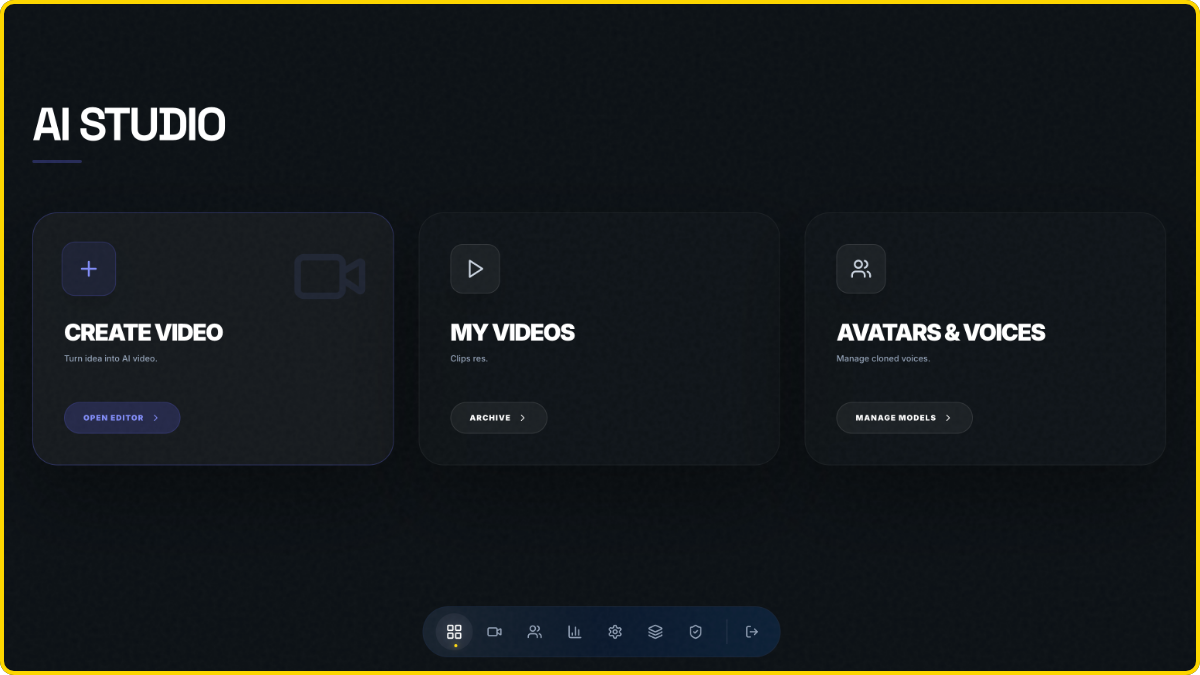
| Orwix Studio | Tolstoy | |
|---|---|---|
| Best for | Performance marketers, SaaS, B2B lead gen, anyone who needs funnel logic | Shopify D2C brands running shoppable video at catalog scale |
| Pricing model | Flat rate, 399 SEK/mo (~$36), unlimited views | Impression-based, $39-$499+/mo, overage billed automatically |
| Platform dependency | Works on any website | Deepest on Shopify; other platforms require manual CSV setup |
| Core strength | Branching funnels with 10 CTA types | AI-powered shoppable feeds and virtual try-on |
| Widget rendering | Shadow DOM + Svelte 5 (zero CSS bleed) | Async JS injection with lazy loading |
| Session memory | Elephant Memory, returning visitors resume mid-flow | Cookie-based personalization; no documented funnel resumption |
Pricing Breakdown - Flat Rate vs. Per-Impression Billing
Tolstoy’s pricing starts at $39/mo but bills per unique impression with automatic overage, meaning costs spike unpredictably with traffic. Orwix Studio charges 399-950 SEK/mo (~$36-$86) flat with unlimited views and zero overage billing. At 50,000 monthly visitors, the cost gap reaches nearly 6x.
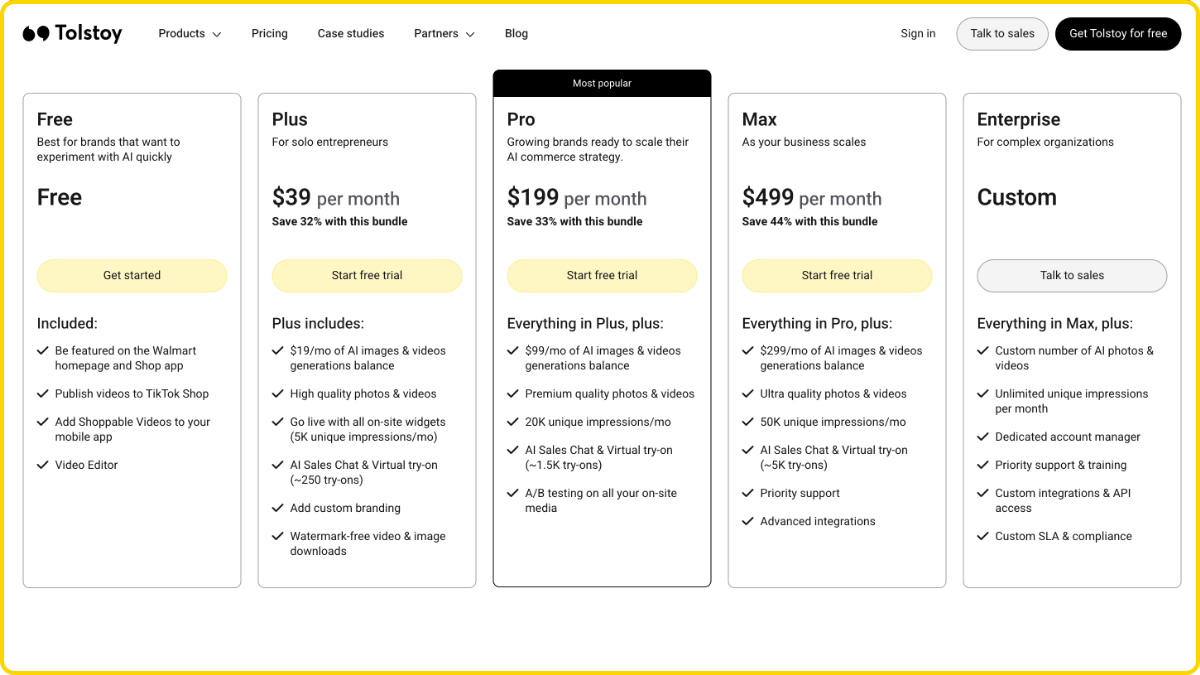
Tolstoy’s Tiered Impression Model
First, a definition most people miss. Tolstoy counts “unique impressions,” not video plays. Every time a Tolstoy widget loads for a unique visitor, that’s a billable impression. The visitor doesn’t need to press play. They don’t need to interact. They just need to land on a page where the widget exists. For most sites, “unique impressions” roughly equals “monthly visitors.”
Overage billing is automatic. There’s no hard cap, no warning email, no pause. Your videos keep serving and Tolstoy keeps counting. On the AI Player standalone, overage rates run $5-$10 per 1,000 extra impressions depending on your tier.
Here’s how the tiers break down for the full AI Commerce Bundle:
- Plus ($39/mo): 5,000 impressions
- Pro ($199/mo): 20,000 impressions
- Max ($499/mo): 50,000 impressions
- Enterprise (custom): 50,000+
The math is simple. If your site gets more than 50,000 monthly visitors, you’re either on the $499 Max plan or negotiating a custom Enterprise contract. “Custom” never means cheaper.
Now here’s where it gets uncomfortable. In November 2023, a Trustpilot reviewer reported that Tolstoy billed for 134,000 page views while their own analytics recorded 2,521 visitors in the same period. That’s a 53x discrepancy. Tolstoy refunded the charges after a joint review but never fully explained the gap. The user wrote that Tolstoy lost credibility the moment they launched plans billed on page views. That billing architecture is still in use today.
This isn’t an isolated complaint. Competitor Moast publicly calls Tolstoy’s $10/1,000 overage rate “expensive fast” and markets unlimited views as a direct counter. On Trustpilot, Tolstoy holds a 2.6 out of 5 (“Poor”) rating as of early 2026, with billing transparency as the dominant complaint. Compare that to their 4.8/5 on the Shopify App Store, where billing friction surfaces less because Shopify handles app charges natively.
Orwix Studio’s Flat-Rate Structure
Two tiers. No impression metering. No overage mechanism.
Start costs 399 SEK/mo ($36). You get 1 active flow with unlimited views. Pro costs 950 SEK/mo ($86). You get 5 active flows, white-label branding, and full branching logic. Still unlimited views.
That’s it. Your traffic can double overnight and your invoice stays the same. No billing event ties to your marketing performance.
The Real Cost at 50K Monthly Visitors - A Worked Example
Theory is nice. Math is better.
| Traffic Scenario | Orwix Studio Pro | Tolstoy |
|---|---|---|
| 50,000 visitors/mo (steady state) | $86/mo flat | $499/mo (Max tier required) |
| 60,000 visitors (viral weekend spike) | $86/mo flat | $599/mo ($499 Max + $100 overage) |
| 100,000 visitors/mo (scaling) | $86/mo flat | Forced custom Enterprise migration |
Read that middle row again. A single good weekend on paid social, one organic post that goes viral, one email blast that overperforms, and Tolstoy’s bill jumps to $599. On Orwix Studio, that same weekend costs you exactly what last month cost you. And the month before that.
Tolstoy taxes your traffic. Orwix charges rent.
Pricing tells you what you’ll pay. The next question is what you actually get for it.
Widget Tech and Site Performance
Tolstoy embeds via async JavaScript injection with lazy-loaded video, claiming minimal Core Web Vitals impact. Orwix Studio renders inside a native Shadow DOM with a compiled Svelte 5 runtime, fully isolating the widget from your site’s CSS. On complex, multi-app themes, that isolation is the difference between a working widget and a support ticket.
Every third-party widget you install is a liability until proven otherwise. It loads JavaScript your visitors didn’t ask for, competes with your theme’s styles, and risks degrading the performance scores Google uses to rank you. A joint Deloitte and Google study (2020) found that a 100ms improvement in Largest Contentful Paint correlated with a 1.11% increase in session-based conversions for retail sites. That’s not a rounding error. For a store doing $500K/year, a slow-loading widget is a line item on your P&L you never approved.
The question isn’t “does my interactive video tool look good?” It’s “does it make my site slower, less stable, or harder to debug?”
How Tolstoy Renders on Your Site
Tolstoy embeds through an asynchronous JavaScript snippet placed in your site’s <head> tag. Videos lazy-load when scrolled into view. The company claims a sub-50KB payload served from a multi-CDN architecture with zero Core Web Vitals impact.
On a clean, default Shopify theme, this probably holds up. The trouble starts when your site isn’t clean or default.
Standard JS injection means Tolstoy’s styles live in your global CSS scope. Every class name, every z-index value, every font declaration shares space with your theme, your other apps, and your custom code. If your sticky header uses z-index: 999 and Tolstoy’s player overlay uses the same value, one of them loses. If your theme’s .button class sets border-radius: 0 and Tolstoy inherits it, the widget looks broken. These aren’t hypothetical bugs. They surface at 11pm before a product launch, and nobody on your team wrote the code causing them.
No documented evidence exists that Tolstoy uses Shadow DOM or any form of DOM-level encapsulation.
How Orwix Studio Renders on Your Site
Orwix Studio’s widget renders inside a native Shadow DOM boundary. This is a browser-level firewall, not a CSS workaround.
Styles inside the Shadow DOM cannot leak out to your site. Styles from your site cannot leak in to the widget. Zero CSS inheritance, zero specificity conflict, zero z-index collision. It doesn’t matter how many Shopify apps you run, how customized your theme gets, or how deeply nested your product page layout is. The widget stays isolated at the DOM level. It can’t break your site because the browser won’t let it.
The Svelte 5 runtime compiles to vanilla JavaScript with no virtual DOM overhead. No diffing engine running in the background. The result is a sub-50KB payload that loads fast and stays out of the way. CLS contribution: zero. LCP impact: none. Your Core Web Vitals scores stay exactly where they were before you installed the widget.
Why This Matters for SEO and Revenue
Google confirmed Core Web Vitals as a ranking signal in 2021. That policy hasn’t changed. Your LCP, CLS, and INP scores directly affect where you appear in search results.
Here’s the conflict most merchants miss: you install an interactive video tool to boost conversion rates, but the tool itself degrades your page speed. Your CWV scores drift into the amber or red zone. Your on-page conversion rate goes up. Your organic traffic goes down. You rob one channel to feed another.
Shadow DOM eliminates that trade-off. The widget runs in its own encapsulated scope, loads under 50KB, and contributes nothing to layout shift. You get the conversion lift from interactive video without paying for it in search rankings.
| Rendering Factor | Orwix Studio | Tolstoy |
|---|---|---|
| Rendering method | Shadow DOM + Svelte 5 | Async JS injection |
| CSS isolation | Full (browser-enforced) | None (global scope) |
| Layout shift risk (CLS) | Zero | Low on clean themes, higher on complex setups |
| Payload size | Sub-50KB | Sub-50KB (claimed) |
| Theme conflict risk | None | Increases with theme complexity and app count |
| Works on any CMS | Yes, single embed | Yes, but depth varies by platform |
Shadow DOM isn’t a feature. It’s the absence of a hundred bugs.
A widget that can’t break your site is a good start. The next question is whether it works on your site at all.
Platform Compatibility - Shopify-First vs. Platform-Agnostic
Tolstoy’s deepest integration is Shopify, with one-click install and automatic catalog sync backed by the “Built for Shopify” badge. Non-Shopify platforms like WooCommerce and Magento require manual CSV product uploads and lack equivalent integration depth. Orwix Studio embeds on any website through a single code snippet with no platform dependency.
Tolstoy’s Shopify Ecosystem Depth
Credit where it belongs. Tolstoy built one of the strongest Shopify integrations in the interactive video category, and the numbers back it up.
The platform holds a 4.8/5 rating on the Shopify App Store across 223 reviews and claims over 5,000 Shopify brands. Installation is one click. The app automatically syncs your product catalog, pulling customers, products, orders, and store analytics directly from your Shopify admin. No CSV files. No manual mapping. No setup calls.
Tolstoy also powers “Shop Videos” for Shopify’s consumer-facing Shop App, giving merchants a free distribution channel that no other interactive video platform offers. Add Walmart homepage syndication on every tier including free, and you have a genuine ecosystem advantage for Shopify-native brands.
If you run a Shopify store, plan to stay on Shopify, and want shoppable video feeds synced to your catalog, Tolstoy’s integration depth is the real thing. No asterisks.
The Non-Shopify Reality Check
Now leave Shopify. The experience changes fast.
WooCommerce requires two separate code snippets plus a manually uploaded CSV product catalog. Every time you add products or change pricing, that CSV needs updating. No automatic sync exists.
BigCommerce gets a one-click install from their app marketplace, which is better. But the data access is shallower than what Shopify merchants receive, and the feature documentation runs noticeably thinner.
Magento and VTEX integrate via embed code snippets. Functional, but bare-bones compared to the Shopify experience.
Wix, WordPress, Squarespace, Webflow: embed code only. No app. No catalog sync. No native product tagging.
Headless or custom builds: the same two code snippets plus CSV. If you want API access for a deeper integration, that’s gated behind the Enterprise tier. Custom pricing and a sales conversation stand between you and your stack.
This isn’t a quality criticism. It’s a priority description. Tolstoy reported $6.2M in revenue with roughly 41 employees as of mid-2024 (GetLatka). A team that size picks its battles, and they picked Shopify. Their case studies feature Shopify brands: Princess Polly, Fenty Beauty, Rhode, ColourPop, Culture Kings. Community, documentation, and support infrastructure all orbit Shopify. If you run WooCommerce, Magento, or a headless frontend, you get a secondary product wearing the same name.
Here’s the quiet risk nobody mentions at sign-up: platform lock-in becomes a migration tax. If you outgrow Shopify or add a headless storefront, your Tolstoy integration doesn’t travel at the same fidelity. Catalog sync, product tagging, shoppable feeds, all of it needs rebuilding on a weaker integration layer. You don’t just migrate your CMS. You migrate your video funnel’s entire data pipeline.
Orwix Studio’s Universal Embed
Orwix Studio doesn’t have a “best platform.” Every platform is the same platform.
One embed snippet. Paste it into your site. The widget runs inside a Shadow DOM, so it doesn’t interact with your CMS, your theme, or your other tools. It doesn’t need catalog access because it builds interactive funnels, not product feeds. No CSV to upload, no app marketplace to navigate, no tiered integration depth based on which CMS you chose three years ago.
Switch from Shopify to WooCommerce? The embed stays the same. Go headless with Next.js? Same embed. Migrate to Webflow? Same embed. The funnel logic, the branching paths, the CTA configuration, none of it changes because none of it ever depended on your platform.
| Platform | Tolstoy Integration | Orwix Studio Integration |
|---|---|---|
| Shopify | One-click install, auto catalog sync, Built for Shopify badge | Single embed snippet |
| WooCommerce | Two code snippets + manual CSV catalog | Single embed snippet |
| BigCommerce | One-click marketplace install, limited depth | Single embed snippet |
| Magento | Embed via code snippets | Single embed snippet |
| Headless/Custom | Two snippets + CSV, API on Enterprise only | Single embed snippet |
| Webflow/Wix/Squarespace | Embed code only, no catalog sync | Single embed snippet |
Your video funnel should outlive your tech stack, not depend on it.
Platform compatibility decides where the widget runs. CTA types decide what it actually does when someone clicks.
Interactive CTA Types - What Can Viewers Actually Do?
Tolstoy provides standard e-commerce CTAs including product cards, contact forms, and calendar booking, with branching logic limited to embedded and branching widget types only. Orwix Studio ships 10 distinct CTA types, including WhatsApp routing, SMS triggers, and conditional promo reveals, all configurable per node inside the visual Studio builder.
Most platforms use the word “interactive” to mean “there are buttons on the video.” That’s not interaction. That’s navigation. Real interaction means a viewer’s choice at node 3 changes what they see at node 7, which CTA appears at node 9, and whether a promo code reveals or a WhatsApp chat opens at node 12. The path reshapes itself around behavior. Not just clicks.
Tolstoy’s CTA Set
Tolstoy ships a solid set of response types for e-commerce. The full list: custom buttons (text-based, redirecting to branches or URLs), product cards with Add to Cart and Buy Now, free text responses, video responses, audio responses, calendar booking, contact forms, image and file uploads, promo code delivery, and default response button sets.
Product cards with direct Add to Cart work exactly the way a Shopify merchant needs them to. Calendar booking handles demo scheduling. Contact forms capture leads. For standard shoppable video, this covers the bases.
Where it falls short is performance marketing. No native WhatsApp chat routing based on funnel behavior exists. No SMS trigger fires when a viewer exits at a specific node. Promo code delivery exists, but it’s a standard action, not a conditional reveal tied to qualifying interactions earlier in the flow.
Here’s the structural constraint that matters most: branching only works on branching widgets and embedded videos. It does not apply to swipeable feeds, stories, carousels, hero videos, or TV pages. That’s sourced directly from Tolstoy’s help documentation. The TikTok-style feed format Tolstoy promotes most heavily? Zero branching logic. The viewer swipes. The viewer watches. The viewer taps a product card or leaves. No conditional path exists.
Orwix Studio’s 10 Action Types
Orwix Studio treats every CTA as a conversion mechanism, not a button style. Ten action types, each designed for a specific moment in a funnel:
- Shopify product cards with Add to Cart
- Lead capture forms with custom fields
- Calendar booking integration
- Promo code reveals, conditional on prior viewer behavior
- WhatsApp chat routing, directed to specific agents or departments based on branch selection
- SMS triggers fired on specific node exits
- URL redirects per branch
- Video responses from viewers
- Conditional buttons that appear, disappear, or change based on earlier choices
- Booking CTAs for service-based businesses
The difference isn’t just quantity. It’s conditionality. A promo code doesn’t reveal itself to everyone. It reveals itself to a viewer who watched past the objection-handling node and selected “yes, I’m interested.” An SMS trigger doesn’t fire blanketly. It fires when a viewer exits at a specific drop-off point, giving you a follow-up channel for the almost-converted.
Every one of these actions is configurable per node inside The Studio, a visual, node-based builder where you map the entire decision tree spatially. Drag connections between nodes. Set if/then conditions. See every path, every exit point, and every CTA placement on one screen. Tolstoy uses a linear part-to-part interface where you connect steps in sequence. For a 3-step FAQ, that works. For a 15-node conditional funnel with multiple exit paths and different CTAs on each branch, you need the spatial map.
Why CTA Variety Matters for Conversion Funnels
Limited CTA types force every conversion path through the same narrow exits. Product card or contact form. Buy or leave. That’s a false binary for most buyer journeys.
HubSpot’s 2024 State of Marketing Report found that personalized CTAs convert 202% better than default versions. That stat usually gets cited in the context of button copy. But the bigger principle applies to CTA format. A WhatsApp button after a product demo node converts differently than a contact form after the same node. The mechanism matters as much as the message.
This is also where the builder matters. You can’t design conditional CTA logic in a linear interface any more than an architect can design a building from a bullet-point list of rooms. You need the blueprint. You need to see which node leads where, which CTA fires when, and where the drop-off points cluster. The Studio is that blueprint.
Orwix’s Studio works identically on mobile and desktop, because the people building funnels at 6am on a commuter train aren’t sitting at a desk. You don’t need an agency. You don’t need a laptop. You need a builder that respects how operators actually work, which is fast, from wherever they happen to be, without waiting for someone else to implement the logic.
| CTA Capability | Orwix Studio | Tolstoy |
|---|---|---|
| Product cards (Add to Cart) | Yes | Yes |
| Contact/lead capture forms | Yes | Yes |
| Calendar booking | Yes | Yes |
| Video response | Yes | Yes |
| Promo code reveal | Yes (conditional, per-node) | Yes (standard delivery) |
| WhatsApp chat routing | Yes | No |
| SMS triggers | Yes | No |
| Conditional CTA logic (if/then) | Yes, per node | No documented conditional CTA behavior |
| Builder Feature | Orwix Studio | Tolstoy |
|---|---|---|
| Visual node-based canvas | Yes (The Studio) | No (linear part-to-part) |
| Branching on all widget types | Yes | No (branching widgets and embeds only) |
| Mobile editing | Full parity with desktop | Not documented |
| Conditional if/then paths | Yes | Limited to branch selection |
A video with buttons is a player. A video with logic is a conversion engine.
CTA types decide what happens when someone clicks. But first, someone has to show up on screen and say something worth clicking for.
AI Video Generation - Who Does More With Less?
Tolstoy offers a three-product AI suite covering catalog-scale image-to-video, virtual try-ons, and AI sales chat, but relies on third-party tools like Synthesia and HeyGen for AI avatar generation. Orwix Studio includes built-in AI avatars, image-to-video, and LLM-powered script humanization. No second video production platform required.
The fastest funnel in the world is worthless if it takes three weeks to produce the video that goes inside it.
You’ve built your branching logic. You’ve configured 10 CTA types. You’ve mapped the decision tree in the The Studio. Now you need someone on screen walking the viewer through each node. A real person or a convincing AI person. Either way, the script needs to sound human and not like a press release. This is the production bottleneck, and it kills more interactive video projects than any technical limitation ever will.
Wyzowl’s 2024 Video Marketing Statistics Report puts hard numbers on it: 33% of marketers don’t create video because they lack time, and 20% cite cost as the primary barrier. Interactive video makes both problems worse. Branching funnels need multiple videos, one for each path, each with its own script and delivery.
Tolstoy’s AI Suite - Strong on Catalog, Silent on Avatars
Tolstoy’s AI capabilities are real. No point pretending otherwise.
AI Studio turns product photos into dynamic videos, generates catalog-scale packshots, and creates AI-powered product imagery without physical photoshoots. For a Shopify brand with 500 SKUs that needs visual content for every product page, this saves weeks of production time and thousands in studio costs.
AI Shopper runs a conversational sales chatbot trained on your brand catalog, complete with virtual try-on for fashion and beauty products. Token-based pricing gives you 250 to 5,000 try-ons per month depending on your tier.
AI Player powers personalized “For You” feeds based on visitor behavior, auto-tags products to videos, and uses social listening to curate UGC from Instagram. Pro plans and above get A/B testing with AI-flagged underperformers and auto-generated variants.
For catalog content production at scale, Tolstoy’s AI is ahead. Full stop.
But here’s what the marketing page doesn’t emphasize: AI avatar generation is not native to Tolstoy. If you need a talking-head spokesperson guiding viewers through a branching funnel, Tolstoy’s own documentation points you to third-party integrations with D-ID, Synthesia, and HeyGen. You leave the platform to create the core content your funnel needs.
That means subscribing to a second SaaS. Synthesia starts around $22/mo for personal use, $67/mo for higher-quality Creator plans. HeyGen runs a similar range. These costs stack on top of Tolstoy’s impression-based billing. You now manage two dashboards, two billing cycles, two support channels, and an export-import workflow every time you produce a new funnel video.
The workflow looks like this: write a script, open Synthesia, generate the avatar video, download it, switch to Tolstoy, upload it, place it in the funnel, repeat for every branch variation. Every tab switch is a friction point where the project stalls or the operator loses momentum.
Orwix Studio’s Built-In AI Media Engine
Orwix Studio collapses that stack into one platform.
AI avatars generate natively inside the editor. No third-party subscription. No export/import cycle. You pick an avatar, feed it a script, and drop the generated video directly into a funnel node.
Image-to-video workflows turn static images into dynamic video content within the same editor. Product shots, lifestyle images, or custom graphics become video assets without leaving the platform.
Script humanization is where it gets interesting. This LLM-powered feature takes your draft script and rewrites it to sound natural, conversational, and human. AI avatars are only as convincing as the words they say. If the script reads like a corporate FAQ, the viewer bounces regardless of how realistic the avatar looks. Humanization is the anti-robot layer. It turns “Our platform provides comprehensive solutions for your business needs” into something a real person would actually say out loud.
Here’s the single-platform workflow: write the script, humanize it, generate the avatar video, drop it into a funnel node, configure the CTA, publish. One tab. One billing cycle. One dashboard. A solo operator can go from concept to live interactive funnel in hours, not weeks. No agency. No production crew. No second subscription eating into your margin.
The Hidden Cost of “Bring Your Own Video”
If your funnel builder doesn’t generate video, someone else fills the gap. That’s either a production agency ($2,000 to $10,000+ per shoot) or your own time fumbling with a ring light and a script taped to your monitor. Or it’s a second AI video subscription running $22 to $67/mo on top of your funnel platform costs.
None of these options disqualify a platform. Plenty of brands shoot great content in-house. But every external dependency adds time, cost, and friction to a process that already struggles with both. The 33% of marketers who cite lack of time and the 20% who cite lack of budget won’t solve those problems by adding another tool to the stack.
| AI Capability | Orwix Studio | Tolstoy |
|---|---|---|
| AI avatar/spokesperson generation | Yes (native) | No (requires Synthesia, HeyGen, or D-ID) |
| Image-to-video | Yes (native) | Yes (AI Studio, catalog-focused) |
| Script humanization (LLM) | Yes (native) | No |
| AI product photoshoots | No | Yes (AI Studio) |
| Virtual try-on | No | Yes (AI Shopper, token-based) |
| AI sales chatbot | No | Yes (AI Shopper) |
| AI-powered A/B testing | No | Yes (Pro+ plans) |
| Third-party video tools required | No | Yes, for avatar content |
Hosting video is a feature. Generating video is an unfair advantage.
AI generation solves the content problem. But what happens when a viewer comes back tomorrow and your funnel has already forgotten them?
Session Persistence - What Happens When Visitors Return?
Tolstoy personalizes video feeds using cookie-based tracking but has no documented mechanism for resuming a branching funnel mid-flow across sessions or devices. Orwix Studio’s Elephant Memory persists session state at the edge, syncing across tabs and devices in real-time and resuming the funnel at the exact point where the viewer left off.
The Conversion Leak Nobody Measures
A prospect spends four minutes navigating your 10-node branching funnel. They answer three qualification questions. They reach the pricing node. Then a phone call interrupts. The browser tab closes. They come back the next day.
If the funnel starts over from node one, that prospect doesn’t re-navigate it. They leave.
Your analytics dashboard shows this as a drop-off. It won’t tell you the viewer was engaged, qualified, and three nodes from converting. It won’t distinguish “lost interest at node 2” from “got interrupted at node 9.” Both look the same in the data. They are not the same in reality.
This isn’t a niche problem. Baymard Institute’s ongoing cart abandonment research (updated 2024) places the average online shopping cart abandonment rate at 70.19%. Among the top reasons: 48% were “just browsing” and 18% found the process too long or complicated. Interactive branching funnels face the same dynamic. The more nodes you add, the more decision points you create, and the higher the probability a viewer won’t finish in one sitting.
Every major consumer platform has adapted to this. Netflix remembers your timestamp. Spotify remembers your queue. Amazon remembers your cart across devices. In 2026, session continuity isn’t a premium feature. It’s baseline. An interactive funnel that resets when a viewer returns feels broken, not just inconvenient.
Tolstoy’s Cookie-Based Tracking
Tolstoy uses client ID cookies to identify returning visitors. The Shopify App Store data access disclosure for their app confirms this.
For Tolstoy’s primary use case, this works. Their AI-powered feeds are described as “tailored to each user’s taste and needs,” meaning the platform tracks browsing behavior across sessions to serve personalized product video recommendations. A returning visitor who browsed running shoes last week sees running shoe content this week. That’s effective personalization for shoppable video.
The limitation shows up in branching funnels. No documented mechanism exists in Tolstoy’s current feature set for resuming a multi-step branching flow at a specific node with previous answers intact. If a viewer clears cookies, switches browsers, moves to a different device, or returns after an extended absence, the branching funnel resets.
To be fair, this isn’t necessarily a flaw in Tolstoy’s architecture. Tolstoy’s most promoted formats, feeds, stories, carousels, and hero videos, don’t have “progress” to save. They’re designed for browsing, not sequential navigation. But if you use Tolstoy’s branching widgets for multi-step qualification, the absence of session persistence becomes a real gap. Every interrupted session is a prospect you qualified and then lost.
Orwix Studio’s Elephant Memory
Orwix Studio treats session state as infrastructure, not an afterthought.
Under the hood, Elephant Memory runs on Cloudflare Durable Objects with SQLite at the edge. It persists the viewer’s funnel state at the server level rather than in the browser. That’s the one technical sentence. Here’s what it means for your pipeline.
Smart Resume picks the funnel up at the exact node where the viewer stopped. Video playback resumes at the precise millisecond. Every previous answer, every branch selection, every qualification response stays intact. The viewer doesn’t re-watch. They don’t re-answer. They continue.
Cross-device sync means a prospect who starts the funnel on a desktop at work can pick it up on their phone during the commute home. The state travels with the viewer, not with the browser. No login required. No account creation friction.
Cross-tab sync keeps parallel sessions consistent. If a viewer has the funnel open in two tabs, actions in one reflect in the other in real-time. No conflicting states. No duplicated submissions.
Cookie independence means the session survives cache clearing, browser switching, and privacy mode. Because the state lives at the edge, not in local storage, a viewer who clears cookies and returns still resumes exactly where they left off.
The revenue math is simple. If 10% of your funnel traffic gets interrupted before completing, and Elephant Memory recovers even half of those sessions, that’s a 5% lift in funnel completions. Not from new traffic. Not from better ads. From prospects who already wanted to finish and now actually can.
| Session Feature | Orwix Studio | Tolstoy |
|---|---|---|
| Returning visitor recognition | Yes (edge-persisted state) | Yes (client ID cookies) |
| Funnel resumption at exact node | Yes (Smart Resume) | No documented capability |
| Video playback resume (millisecond) | Yes | No documented capability |
| Previous answers preserved | Yes | No documented capability |
| Cross-device sync | Yes (real-time) | No documented capability |
| Cross-tab sync | Yes (real-time) | No documented capability |
| Survives cookie clearing | Yes (server-side state) | No (cookie-dependent) |
Forgetting a warm lead costs more than acquiring a cold one.
Elephant Memory recovers prospects other platforms lose. But no tool is right for everyone, and pretending otherwise is the fastest way to lose your trust.
Who Orwix Studio Is NOT For
Orwix Studio is not built for catalog-scale shoppable video feeds or AI virtual try-ons. Brands that run large Shopify stores with hundreds of SKUs, need AI product photography, or want TikTok-style swipeable feeds synced to a product catalog should evaluate Tolstoy. Orwix is built for branching funnels, not browsable feeds.
Pick Tolstoy If…
You run a Shopify store and your primary goal is displaying shoppable video feeds on product pages, collection grids, and homepages. Tolstoy syncs directly with your Shopify catalog and pulls product data automatically. No CSV uploads. No manual mapping. Tolstoy’s own case study with Princess Polly reports a 31% higher average order value from shoppable video integration (Tolstoy, 2024).
You need AI-generated product photography at catalog scale. Tolstoy’s AI Studio turns product photos into dynamic video content and generates packshots without physical shoots. If you manage hundreds of SKUs and need visual assets for each one, this addresses a real production problem.
You want virtual try-on for fashion or beauty products. Tolstoy’s AI Shopper offers this on a token-based model, ranging from 250 to 5,000 try-ons per month depending on your tier.
Free distribution through Shopify’s Shop App and Walmart homepage syndication matters to you. Tolstoy offers both, including on their free tier. No other interactive video platform provides native Shop App publishing.
You accept impression-based billing and your monthly traffic stays under 20,000 unique visitors. At that volume, Tolstoy’s Pro tier ($199/mo) covers you without overage charges.
Your use case is product discovery and browsing, not multi-step qualification funnels. Tolstoy designed its strongest formats, feeds, stories, carousels, and hero videos, for exploration. If your viewers browse rather than navigate a decision tree, that’s the format you need.
The best tool is the one that matches your workflow, not your wishlist.
Pick Orwix Studio If…
You need branching funnels with conditional if/then logic. Not linear video feeds. Not swipeable stories. Funnels where a viewer’s choice at node 3 changes what they see at node 8 and which CTA appears at node 12. The Studio builder maps this visually, and it works identically on mobile and desktop.
More than product cards and contact forms belong in your toolkit. Orwix Studio ships 10 CTA types including WhatsApp chat routing, SMS triggers, conditional promo code reveals, calendar booking, lead capture, and Shopify product cards. Every action configurable per node.
Flat-rate pricing with unlimited views fits how you budget. Start at 399 SEK/mo ($36) for 1 active flow. Pro at 950 SEK/mo ($86) for 5 active flows with white-label and full branching. No impression metering. No overage billing. Your invoice stays the same whether you get 500 views or 500,000.
Your stack runs on WooCommerce, Magento, Webflow, a headless frontend, or anything outside Shopify. Orwix embeds through a single code snippet. Same widget, same features, same performance on every platform. No tiered integration depth.
Session persistence matters for your multi-step funnels. Elephant Memory resumes the funnel at the exact node where the viewer left off, with previous answers intact, across devices and browsers. Cookie clearing doesn’t reset the flow.
Built-in AI avatar generation and script humanization eliminate the need for a second platform. Write the script, humanize it, generate the avatar video, drop it into a funnel node, and publish. One tab. One subscription.
A widget that can’t break your site is non-negotiable. Shadow DOM encapsulation with compiled Svelte 5 guarantees zero CSS conflicts, zero layout shift, and zero Core Web Vitals degradation regardless of theme complexity.
Now that you know which side of the line you’re on, here’s the summary.
The Bottom Line
Choose Tolstoy for Shopify-native shoppable video with AI catalog tools, virtual try-on, and Shop App distribution. Choose Orwix Studio for branching interactive funnels with flat-rate pricing, 10 CTA types, Shadow DOM rendering, Elephant Memory session persistence, and built-in AI video generation on any website.
Tolstoy is a shoppable video commerce platform. Orwix Studio is an interactive video funnel builder. The category label is the same. The tools are not.
| Your Primary Need | Recommended Platform |
|---|---|
| Shoppable video feeds on Shopify | Tolstoy |
| AI product photography at catalog scale | Tolstoy |
| Virtual try-on (fashion/beauty) | Tolstoy |
| Shop App and Walmart distribution | Tolstoy |
| Branching funnels with conditional logic | Orwix Studio |
| Flat-rate pricing, unlimited views | Orwix Studio |
| WhatsApp, SMS, and 10 CTA types | Orwix Studio |
| Platform-agnostic embed (any CMS) | Orwix Studio |
| Session persistence across devices | Orwix Studio |
| Built-in AI avatars and script humanization | Orwix Studio |
| Shadow DOM rendering (zero CWV impact) | Orwix Studio |
You’ve read the comparison. You have the data. The next step is yours.
FAQ - Orwix Studio vs Tolstoy
Is Orwix Studio cheaper than Tolstoy?
At any meaningful traffic volume, yes. Orwix Studio Start costs 399 SEK/mo ($36) with unlimited views. Pro costs 950 SEK/mo ($86) with unlimited views. Tolstoy’s $39/mo Plus tier caps at 5,000 unique impressions with automatic overage billing at $10 per 1,000 extra impressions. At 50,000 monthly visitors, Tolstoy requires the $499/mo Max tier. Orwix Pro stays at $86/mo flat.
Does Tolstoy work outside of Shopify?
Yes, but with reduced integration depth. WooCommerce and headless builds require manual CSV product catalog uploads and two code snippets. BigCommerce has a one-click marketplace install but shallower data access than Shopify. Magento, Wix, Webflow, and Squarespace get embed code only with no catalog sync. API access for custom integrations is gated behind Tolstoy’s Enterprise tier.
Can Orwix Studio replace Tolstoy for shoppable video?
For interactive funnels with branching logic, conditional CTAs, and session persistence, yes, Orwix Studio covers everything Tolstoy doesn’t. For large-catalog shoppable feeds with AI product tagging and virtual try-on, Tolstoy serves a use case Orwix doesn’t target. Different tools built for different workflows. Your use case determines the right pick.
Which platform has better site performance?
Both claim minimal Core Web Vitals impact. Orwix Studio renders inside a Shadow DOM with compiled Svelte 5, guaranteeing CSS isolation and zero layout shift on any theme. Tolstoy uses async JavaScript injection with lazy loading, which performs well on clean setups but risks CSS conflicts on complex, multi-app themes. No documented Shadow DOM usage exists from Tolstoy.
Does Tolstoy charge per video view?
No, per unique impression. Tolstoy counts an impression every time a widget loads for a unique visitor, regardless of whether they press play or interact. Overage billing is automatic with no hard cap, meaning videos keep serving and charges accumulate without a warning stop. Orwix Studio charges a flat monthly rate with unlimited views and zero impression metering.